




Listen to this article:
It's the third week of the month, and your HR director asks a simple question: Of this month's six new hires, which ones are fully set up? You know the contracts went out. You think IT sorted the laptops. Whether the managers held their first one-to-ones, you'd have to ask each of them.
Nothing went wrong, exactly. The checklist said what needed doing, and it had no way to say what got done.
Why do onboarding checklists stop working?
Usually because nobody owns the rows. A list sorted by date and owned by "HR" in general works while one person runs every onboarding. It stops working when hiring picks up and the tasks spread across HR, IT, payroll, facilities, and a different manager for every hire. Each manager does it their own way, and HR ends up tracking progress by hand, chasing people for updates on tasks that were never clearly theirs.
The cost shows up early. In the CIPD's 2024 survey of 1,016 UK people professionals, 41% of employers who'd recruited in the previous year had seen a new employee resign within the first 12 weeks, and 27% had a new starter who didn't turn up on day one. Not every early exit is an onboarding failure. But in the first weeks, a new hire decides whether the company has its act together, and a missing laptop or a manager who never finds time for a first conversation answers that question for them.
What fixes most of it are two more columns on every row: who owns the task and what proves it's done.
The four-column checklist
Every row carries a task, an owner (a role, so it lands on whoever holds that role for this hire), a deadline counted from the start date, and the proof: what shows the task happened, and who confirms it. A row without an owner gets done by whoever remembers. A row without proof only tells you someone believes it's done.
The employee onboarding checklist, by owner and stage
Seven owners appear below: HR, Manager, IT, Facilities, Payroll, the new hire, and a Health & Safety (H&S) officer, where the role needs a safety induction. Deadlines count from the start date, so "start −5" means five working days before day one. Every row works without any particular software, and the legal steps for EU and UK employers have their own table after this one.
In Mirro, each row becomes a task in a workflow. The new hire and their manager are built-in roles, and HR, IT, Facilities, Payroll, or an H&S officer are groups you set up once. Mirro then works out who that is for each hire. Deadlines count from the hire date, and a workflow can start in preboarding once the new hire's profile exists in Mirro.
Preboarding
Day one
First week
First month
To the end of probation
Some of this the new hire does on their phone. People without a company email can join Mirro by QR code, and their tasks work on the Mirro mobile app, which matters if you're onboarding frontline teams who never sit at a desk.
What legal steps do EU and UK employers add?
The table below covers what employers in the EU and UK have to do between the offer and the end of probation. It sets out the common floor. Each country writes its own version of the EU rules, and several are stricter: written terms due before the contract is signed or on day one, an employee register filing the day before the start, a medical certificate before hiring, probation shorter than six months. Check your own country's text. This isn't legal advice.
EU and UK only: the legal steps
Most of this traces to three EU texts: the directive on transparent and predictable working conditions (written terms, probation, mandatory training), the health and safety framework directive (training on recruitment), and the GDPR. The right-to-work check and the day-one written statement are UK rules.
Two things tend to catch people out. An EU-wide process set to "written terms within a week" is late wherever national law wants them on day one or before signing. And because probation has a legal maximum, onboarding has a legal end date, which is one more reason to plan the checklist all the way to it.
GDPR: what to collect, what to tell them, who sees it
Onboarding is where an employer collects the most personal data at once, and the instinct is to collect everything that might be useful. GDPR asks for the opposite.
Tell them before you ask. The privacy notice is due "at the time when personal data are obtained" (Art. 13), so it goes out with the first form. The welcome pack on day one is too late.
Don't rest it on consent. In employment, consent is rarely freely given, and the European Data Protection Board says plainly that for most processing at work the lawful basis "cannot and should not be the consent of the employees". Onboarding data rests on the contract or on a legal obligation such as tax, social security, or a right-to-work check.
Collect less. For every field on the new-hire form, ask what it's for. Bank details pay wages. Health information needs a law that requires it, such as a mandatory pre-employment medical certificate, and in most roles it doesn't belong on the form at all. Criminal-record checks also need a legal basis. "It might be useful later" isn't a purpose.
Where there's a works council, ask it first. In some countries, standard personnel questionnaires and technical systems that can monitor behavior or performance need their agreement. Agree on the onboarding form before it goes out.
Limit who sees what. GDPR's security article names unauthorized access as a risk to guard against (Art. 32). In practice, the IT lead needs a start date and a role and has no use for a passport scan.
In Mirro, the new hire and the IT lead each see only the tasks assigned to them; managers see only their direct reports' onboarding; and the Workflow Manager per Location right lets a local HR partner run workflows for their site's people without seeing anyone else's. Attach policies to tasks, and keep the new hire's ID documents in their employee record, where access is controlled.
Decide how long you keep it. GDPR sets no number; you set it, document it, and stick to it. Some national data protection authorities publish retention tables for HR records, which are worth checking for your country. For the vendor side of the question, where your HR system stores this data, see our guide on what to ask an HR software vendor about GDPR.
What should a manager's onboarding checklist include?
The tasks marked "Manager" in the tables, plus the handoff from HR. HR's work ends where the manager's begins, and that point is usually implied. Make it explicit.
That table is worth forwarding to your hiring managers as it stands. It's also the answer to "each manager does it their own way": they still can, inside a structure where the steps that matter are theirs, dated and visible.
Some of those steps need the manager's judgment, and a tick from the new hire isn't the same thing. So every task in Mirro can carry two lists. The Employee Checklist is the new hire's own. The Manager Checklist is visible to the new hire, but only their manager or head of department can tick it, which makes it the place for validation steps. Turn on Requires manager approval and the new hire can comment and work through their list but can't mark the task complete. The manager, or someone above them, signs it off. Managers see each direct report's progress on the My Team tab and can start a workflow from there too.
The weekly conversation matters more than any tick, though. If your managers want a model, here's how to run a one-to-one that isn't a status report.
Mirro's Workflows Grouped as Employee Paths
Where does onboarding end?
At the probation decision. It's the date in the contract, and it's when the manager decides whether the hire has worked out, so the checklist should run until then.
Ending there changes how you plan the first weeks. If the decision will be judged against criteria, those criteria have to exist at the start, written down, and shared. Some countries make that law and require the employer to explain how performance will be evaluated before the contract is signed. Everywhere else, it's simply good practice. A probation decision against criteria nobody wrote down is a judgment call dressed up as a process, and new hires can tell.
For many roles, probation is less about a reflective conversation than confirming specific skills: the forklift certificate, the till procedure, the safety standard. That suits a pass/fail list. In Mirro, a Probation journey can hold one task per skill, each under Requires manager approval, so only the manager or someone above them can mark it as validated. The new hire sees the list from day one and knows exactly what they're being assessed on.
Once probation is passed, the conversation moves to ongoing performance management: goals, check-ins, and reviews. The handover is cleaner when you write down the probation criteria in the first place.
How do you know it's done?
By reading the proof column. Go back to the opening question: which of this month's six new hires are fully set up? With the four columns, the answer is a filter. Every row with an empty proof column is a task that hasn't happened yet, and the owner column says whom to ask.
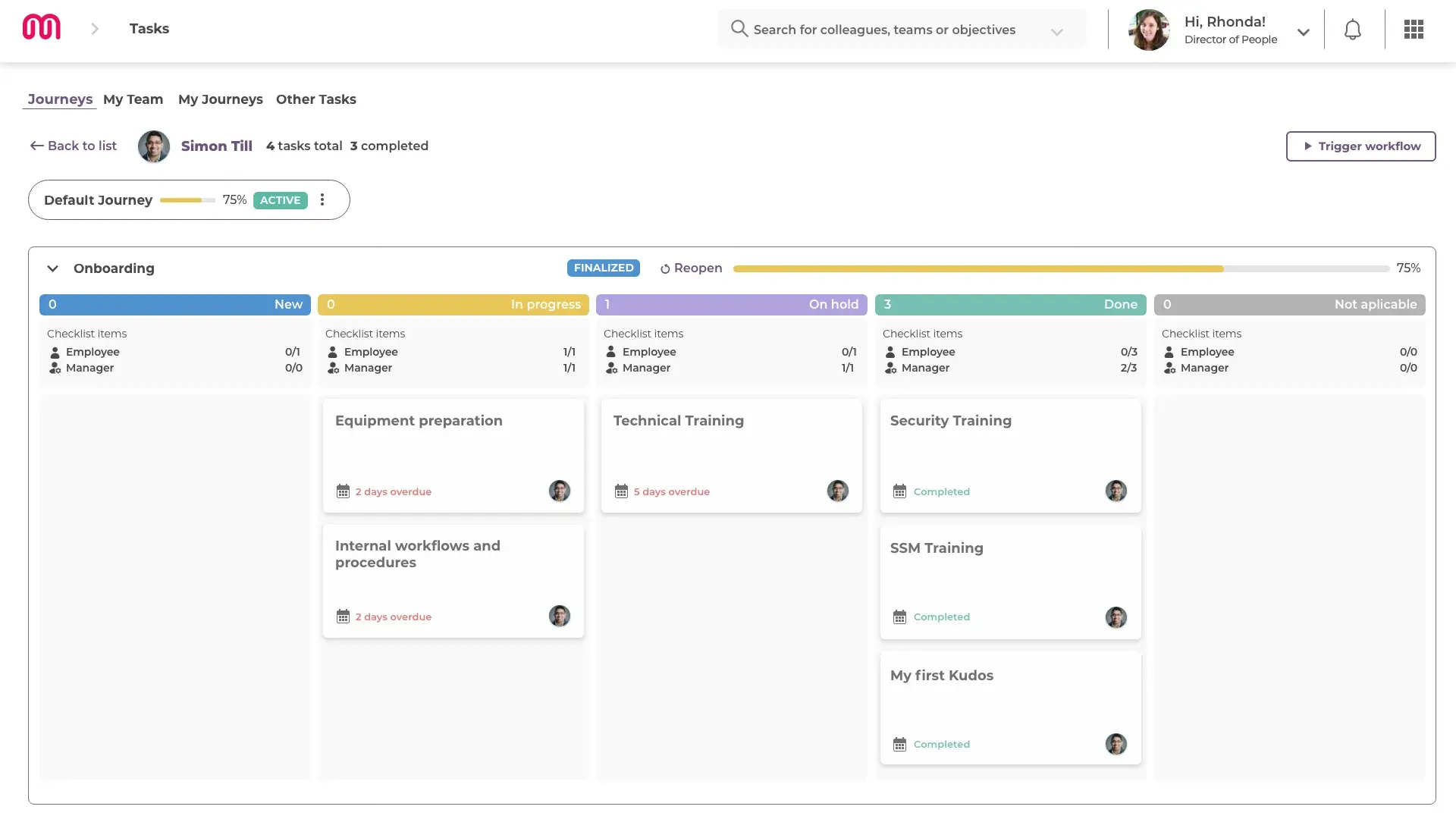
A spreadsheet answers that if everyone keeps it updated. In Mirro, the Journeys tab gives Workflow Admins one view of every active onboarding, each with a completion bar colored by progress, and you can click through from a journey to a workflow to one new hire's tasks. Each task keeps an activity log: who changed it, when, and to what. A task marked Not Applicable still counts as complete, because skipping a step that doesn't apply to this role is a deliberate decision, recorded with a reason.
When onboarding ends, the manager or an admin finalizes the run, and every task locks as-is. Months later, the task history still shows who confirmed each step and when. It doesn't replace the signed forms or the proof of receipt the law asks for. Keep those where they belong.
If your checklist lives in a spreadsheet
Keep it there if it's working. Add the owner, deadline, and proof columns, and a spreadsheet will do most of what this article describes. Plenty of companies run onboarding well that way, and the tables above paste straight in.
Three things get harder as you hire faster. A spreadsheet can't stop a new hire from ticking a step that needed the manager's judgment. It doesn't tell anyone their row has started. And a cell can be edited after the fact, which is fine until someone asks for a record. If none of that has bitten yet, a better spreadsheet is the right next step. When it has, it's worth reading up on how HR workflows remove manual work from recurring processes.